

Custom beats cost money and time to produce and hiring someone to make you a beat for your Podcast intro or a track for your video costs a fortune. Sure, the results are worth it, but this legacy method of getting the right content for your projects detracts from your creative process—and your budget.
Music gives a YouTube video, Instagram Reel, or TikTok video a different feel, ramping up audience engagement. It makes the user more likely to continue watching your video instead of scrolling away to the next video in their feed. Music makes your podcast intro memorable, and it makes educational content more appealing.
But there are several problems involved with sourcing the music you need. Traditionally, you’d look at hiring creators to help you with the project, but that’s not a great idea and gives your project another point of failure.
What if you could let AI do all of the heavy lifting for you?
Don’t Get Caught Up in Licensing and Copyright Issues

Imagine you spend ages digging through the crates to find the perfect sample for your podcast intro music. You spend another day or two crafting the perfect intro track, anticipating an amazing audience response.
But then you air your first video and immediately get hit with a copyright strike, and YouTube isn’t happy with you. Even worse, your video gets demonetized, and all your profits go to the owner of the copyrighted material—what a waste of time and energy.
With AI-driven music platforms, you get original work, in seconds. There’s no waiting around and no worrying about copyright violations or paying royalties to other artists or labels. You get 100% ownership of the material you create with the tool, and you can use it for any commercial purpose.
Don’t Waste Time and Money on Creators

You gave the creator the project over a week ago and they still haven’t delivered anything for you to review. It’s frustrating waiting on people, and when you do eventually receive the files, you need to make requests for editing. It could take weeks for you to get the job finished, and time isn’t on your side.
AI-generated music platforms take away the annoying frustrations of dealing with other creators on your projects. Instead of waiting weeks for deliverables, you have everything you need finished and polished to perfection in less than an hour—and it costs you next to nothing. Slash your production budget and get more done in less time with AI.
AI – Everything You Need in a Music Production Studio
It’s time to move on from the legacy creative process and shift to a new school of thought. Learning to generate beats with AI is simple, provided you have the right tools. Some are easier to master than others, and some have more powerful features, but when you land on the right tool, it can totally revolutionize your creative process, bringing something fresh to the table that delivers real value to your work.
One of the biggest barriers to entry in the music production world is the high cost of equipment, and the knowledge required to use post-production tools. People study these subjects for years to get a firm grasp on every aspect of the creative process.
AI has turned this legacy production medium on its head, totally disrupting the industry. Now, anyone can make pro-level beats for their songs and videos with an AI-generated production studio offering a full-fledged creative process from front to back.
SOUNDRAW – The Next-Generation AI Music Production Platform
When it comes to recommending the best AI-driven sound production platforms, there’s only one you need to know—SOUNDRAW. This intuitive platform gives you a new avenue of creative expression to wander down, and the tools to navigate your AI production experience.
SOUNDRAW beats are royalty-free, and you hold the license to everything you create on the platform. That means no more copyright strikes or requests to take down your content. You get complete creative ownership over your tracks for any commercial use. That means that with an Artist subscription you can use SOUNDRAW beats on your monetized content, without paying any royalties.
But it’s not just the license-free aspect of SOUNDRAWs AI-driven platform that makes it stand out—most AI tools offer this guarantee. What makes SOUNDRAW a real winner is its user-friendly interface and amazing click-based prompting system. Then there’s the AI-powered post-production suite that turns your track into a truly original work.
Let’s walk you through what you can expect when using SOUNDRAW to create your projects.
Easy Prompting and Fast Idea Generation
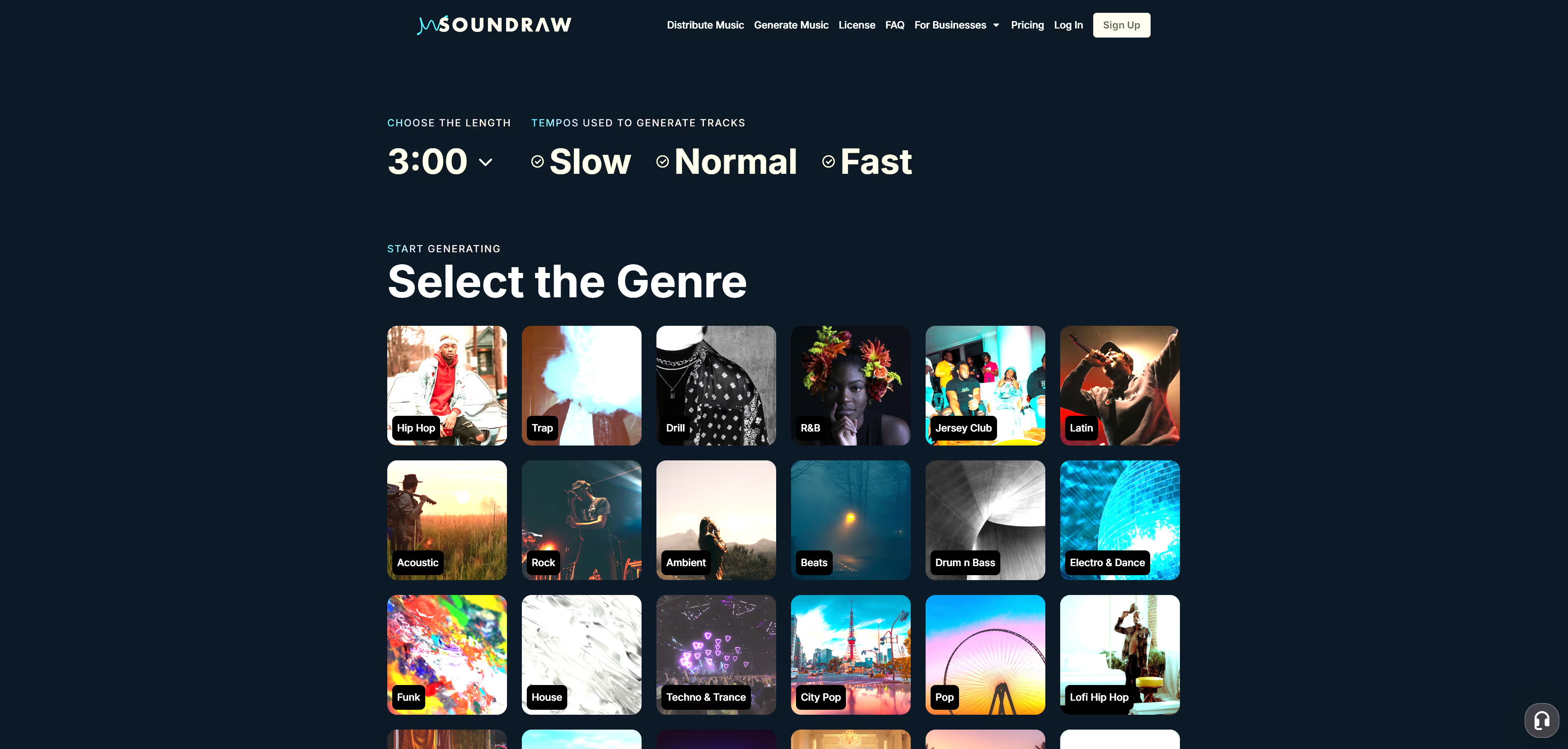
After logging onto the site, click the “Generate Music” tab on the top ribbon and you’re on your way to enjoying your first AI production experience. The platform sends you to another page where you’ll see click-based prompts at the top of the screen. The first is for selecting the track length with options for intervals ranging from 10 seconds to 5 minutes. Choose the tempo and then look at the genre thumbnails below.
Click a thumbnail that best describes what you’re looking for, and the platform opens the editor for your post-production work. In the main pane, you’ll see six options for tracks made according to your prompts. Preview them and see if any of them catch your ear. If they don’t, or you feel they’re missing something, look at the tabs at the top of the window.
Play around with the genres and add or remove them at will to create unique crossover sounds. Select the theme that you want to create for a commercial project, this is a great prompt set for marketers, and change the mood of the music. You also have the option of adding instruments like drums and keyboards to further refine your sound.
Intuitive UX for Simple Editing with Advanced One-Click Tools for Post-Production
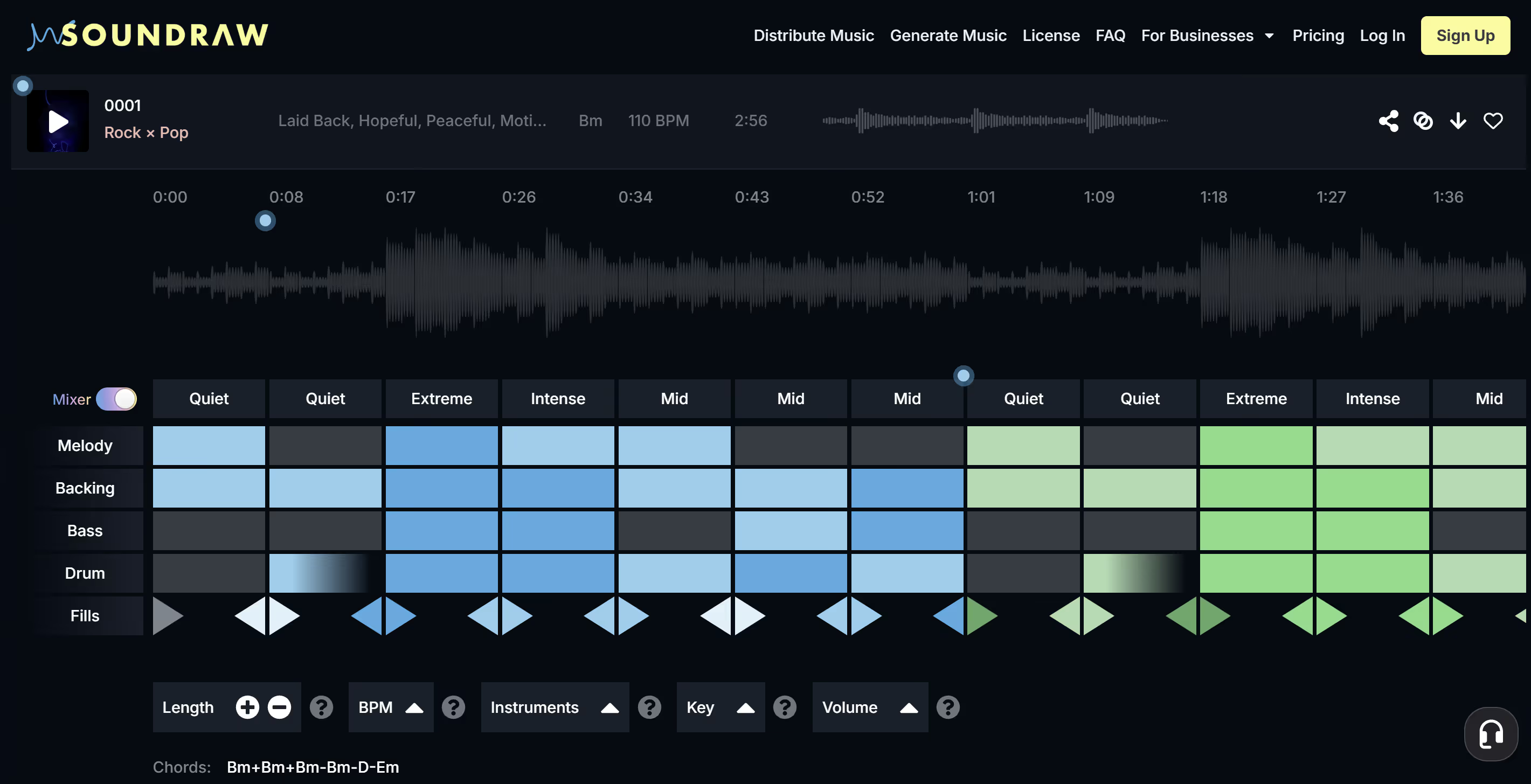
The basic editing phase is impressive in itself, but the Mixer is where SOUNDRAW really starts to shine. One of the drawbacks of using past AI music generators was that you had to add your files to a DAW to complete post-production work. SOUNDRAW V2 takes care of that within the platform.
Check out the blocks below the track preview bar and you’ll see a grid for each section of the track and a list of elements that you can change to your preferences. It’s all a click-based interface, and it's so easy to use that by now you’re beginning to understand why we recommend this tool so highly.
There’s no complex learning curve and you can get a full understanding of how to use the editing suite in a few minutes. But that’s not to say that the quality of the post-production tools is shoddy. They produce fantastic results that leave you wondering how it’s even possible technology could advance this far into the music production scene without you noticing it before.
Affordable Subscriptions
The cost of production and editing tools makes it hard for struggling artists to afford the software and equipment they need to launch their careers. SOUNDRAW breaks down these barriers with a simple, monthly subscription that’s affordable and a fraction of the cost of professional software. Try it for as little as $12.99 per month—that’s less than the cost of a Netflix subscription, and guaranteed to do more for your career than any other tool in this price range—if there even was one.
Try SOUNDRAW for Yourself – It’s Free
SOUNDRAW sounds great, right? It’s basically the one tool your basement or mobile music studio can’t do without, especially in the modern era of music creation. If you’re pumped up to see what AI can do for your next project, you can try SOUNDRAW for free, right now. Just think—in a few minutes from now you could be listening to your first fully AI-produced and edited track.
Just log onto the SOUNDRAW site and click the “Generate Music” tab on the top ribbon to start the creative process, and just like that, you’re making AI music. If you want to download your track, you’ll need to register an account and take a subscription.
The Creator package gives you unlimited downloads of royalty-free AI beats, and the Artist packages let you add your vocals and instrumentals to your tracks, and it gives you the full distribution rights to the track so you can monetize your content.
SOUNDRAW has subscription packages for any creative requirement and any budget. You can do anything with this tool, from creating podcast intro music to hip-hop samples, and even full-length audio tracks. Its versatility is amazing, and the intuitive UX means you don’t need a sound engineering degree to get the most out of the platform.
Go ahead, try it for yourself. Visit SOUNDRAW and dive headfirst into the AI music revolution!
