

Ever notice how the best ideas always seem to bubble up in your frontal lobes when you're nowhere near your setup? Maybe you're taking the A-train to work, or waiting in a checkout line at Whole Foods when the perfect melody suddenly wanders into your mind.
Before, you'd desperately attempt to scribble down a note or hum the tune quietly to yourself, hoping you'd still remember it later. More often than not, those ideas vanish before you ever get around to writing them down.
But now? With mobile music apps, you can capture and develop them on the spot—no more lost inspiration. Whip out your phone, open a mobile music app, and start building a complete track right there while you’re standing in line or traveling to the station.
Musicians are ditching traditional studios and adopting mobile production apps, and it’s easy to see why. For basement producers, indie artists, or anyone messing around with samples or loops, music production has never been simpler—thanks to AI.
Why Limit Yourself to a Studio?
For years, it took a significant financial investment to make professionally sounding music. Musicians had to pay for expensive studio time, top-rated software, and high-level recording equipment just to get started.
That put independent artists at a huge disadvantage, with high-level production out of reach. Mobile music apps are breaking down those barriers, offering the same fundamental tools—virtual instruments, effects, and mixing capabilities—at a fraction of the cost.
No More Studio Fees (Or Excuses)
The shift isn’t just out of affordability but of accessibility. Before, limited resources meant artists couldn’t record or produce their music at all. Now, anyone with a smartphone can produce, refine, and publish tracks without worrying about the costs of expensive equipment. Music production is no longer just for those with deep pockets—it’s for anyone who wants to create.
AI Music Is Changing the Game
One of the most exciting things happening in mobile production right now is the advent of AI-powered music apps, and that’s where SOUNDRAW comes in. Instead of having to organize every sound manually, you prompt the platform with what kind of track you’re looking for—genre, mood, tempo—and it generates an original track for you.
Think of it as a producer in your pocket that lays down the groundwork for your tracks in seconds. Instead of starting from scratch, you're presented with a tangible instrumental basis to build on—whether that's adding lyrics, adding effects, or rearranging sections to suit your vision.
AI music is speeding up the creative process, giving artists immediate access to custom tracks based on their style. Whether you need a backing track or a spark of inspiration, mobile AI cloud platforms and apps are streamlining music production, making it faster, and a whole lot more fun.
How Musicians Make Use of Mobile Music Apps
More artists than ever are skipping the conventional studio and producing whole projects on their phones. Here’s how different kinds of musicians are using mobile music apps and cloud platforms like SOUNDRAW to enhance their projects.
Independent Artists Producing Their Own Music
Not every artist can afford a producer or a high-end studio. Mobile apps enable independent artists to record their own music without a complicated setup. SOUNDRAW's AI-created royalty-free tracks are an industry first that enables artists to create customized instrumentals without licensing or copyright issues. If you take an Artist subscription to the platform, you get full rights to publish and monetize the content on sites like SoundCloud, Spotify, and YouTube Music.
Artists Experimenting with New Sounds
Producers are always looking for new concepts, and working from the ground up can be intimidating at times. AI software like SOUNDRAW generates unique beats and melodies that producers can edit using the platform's advanced post-production tools.
Songwriters Laying Down Demos
You understand creative agony if you’ve ever had a song idea and no way of recording it properly. Instead of letting ideas get away from you, mobile apps let you create instant demos. Use SOUNDRAW to create a backing track in a few minutes, so you can focus on writing lyrics and developing melodies.
Content Creators and YouTubers
Content creators need background music for videos, podcasts, and streams, but using licensed music leads to copyright strikes. SOUNDRAW solves this problem by creating royalty-free tracks for use in any commercial purpose, making it a perfect choice for YouTubers, TikTokers, and podcasters who want original, license-free music.
Try SOUNDRAW for Free Right Now and Make Your First Track in Less than 5 Minutes
It’s time to check out all the hype for yourself. This five-step guide gives you everything you need to make your first track on SOUNDRAW. Log onto soundraw.io and follow along. You’ll have your first AI music track ready to go in the next five or ten minutes.
Sound good?
Great, well, then here we go!
Step #1 – Visit SOUNDRAW
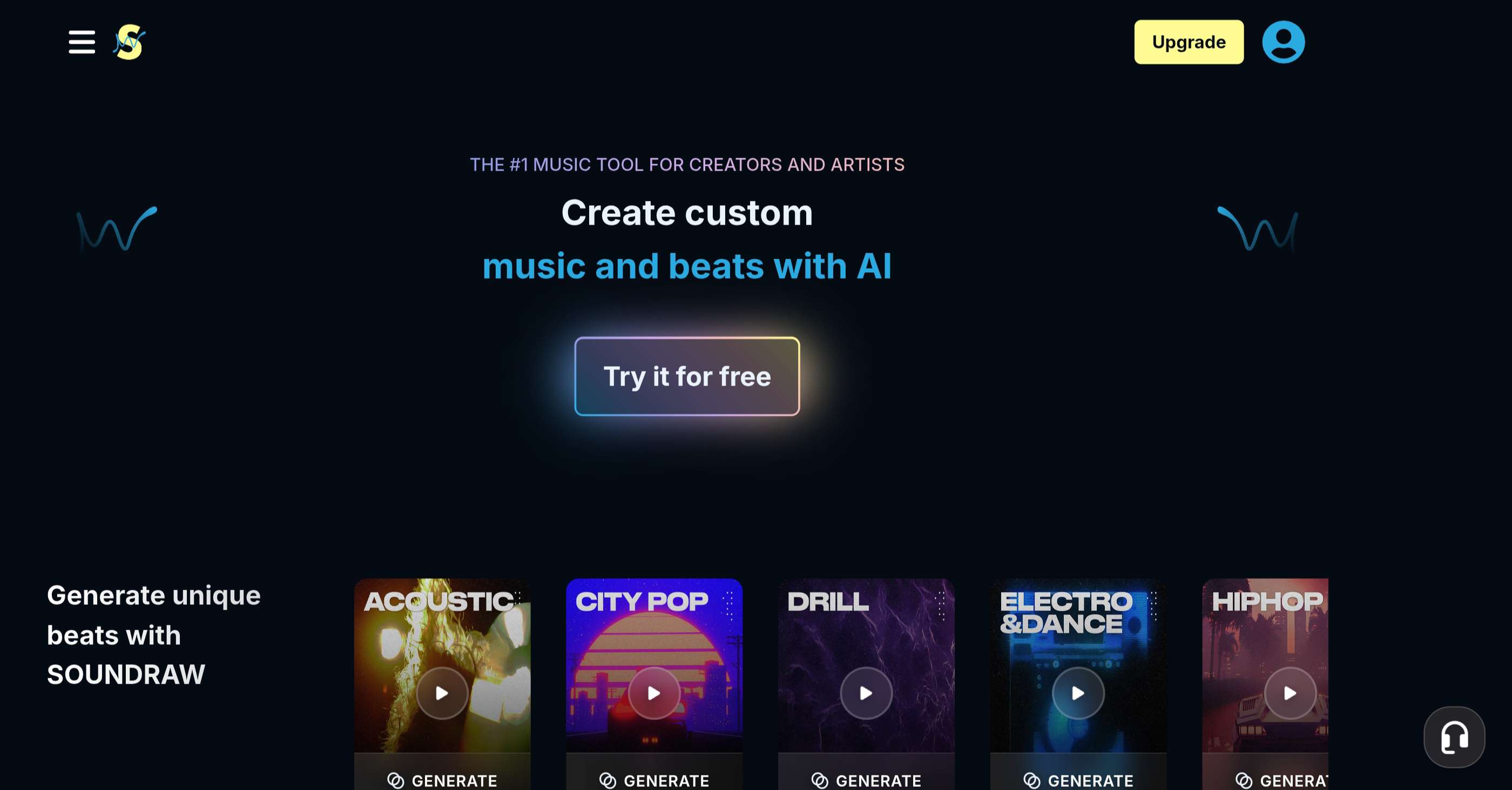
Type soundraw.io into your browser and you’ll land up on the platform’s home page. This site provides the same experience for mobile users and desktop users, with no difference in the interface, features, functions, and creative process.
Step #2 – Start Prompting
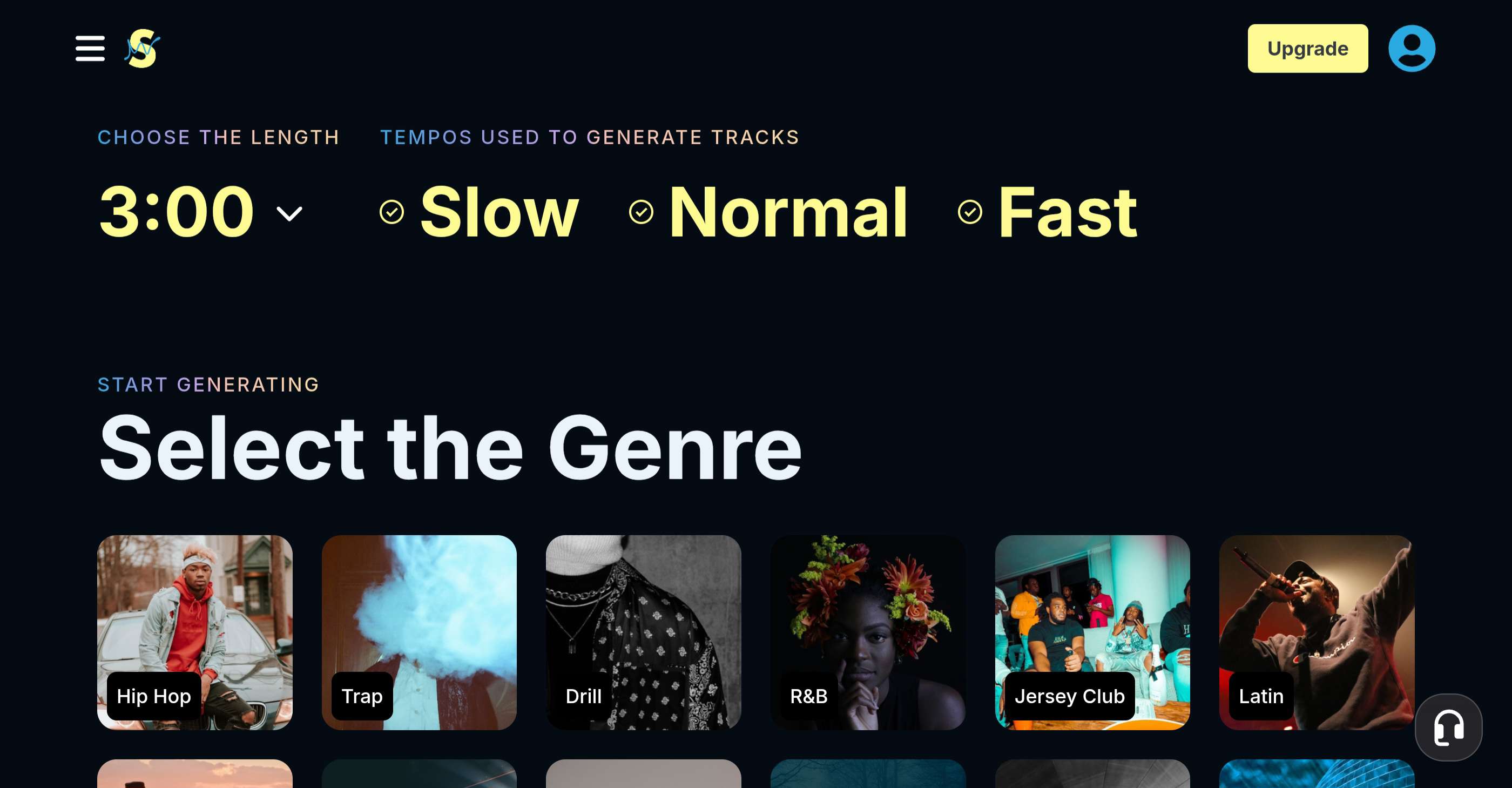
When you arrive on the homepage, click the “generate music” button to get started. The platform sends you to another page where you’ll see prompt boxes. The awesome thing about SOUNDRAW is that you prompt the tool with clicks instead of typing into a text box.
That might seem arbitrary, but it’s a big bonus for the creative process and you won’t ever feel stuck with writing your prompts. Select the track length and the tempo before tapping one of the genre thumbnails below.
There are 21 different genres to select, choose the one that’s closest to the sound you want to create. As soon as you click it, the system pulls you into the advanced back-end post-production studio for further refining of your track.
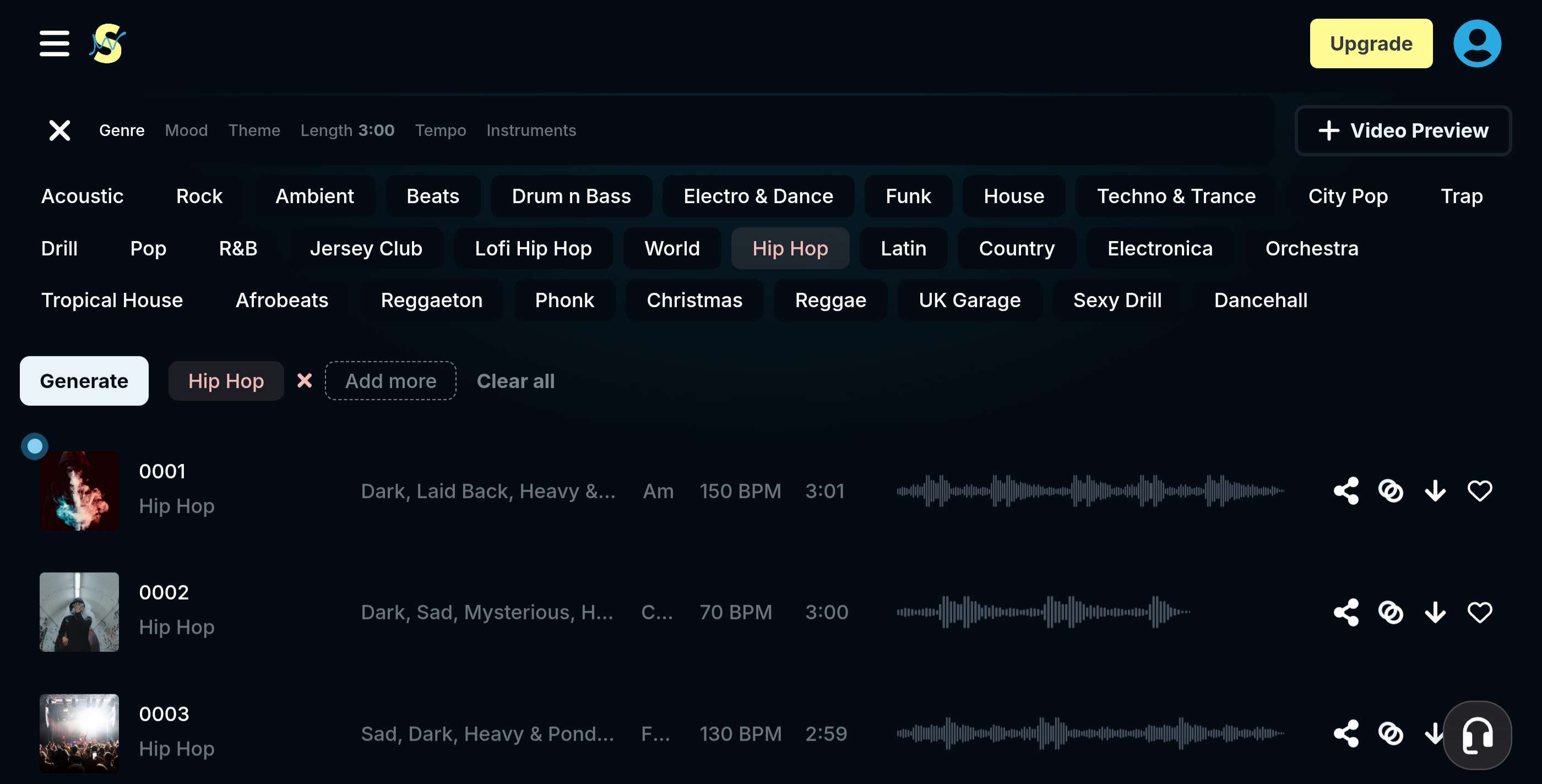
You’ll see a ribbon on the top with tabs for genre, mood, theme, instruments, tempo, and length. Play around with the settings and hit “generate” to get six fresh tracks delivered to the window below the editing ribbon.
Step #3 – Use the Mixer Post-Production Tool
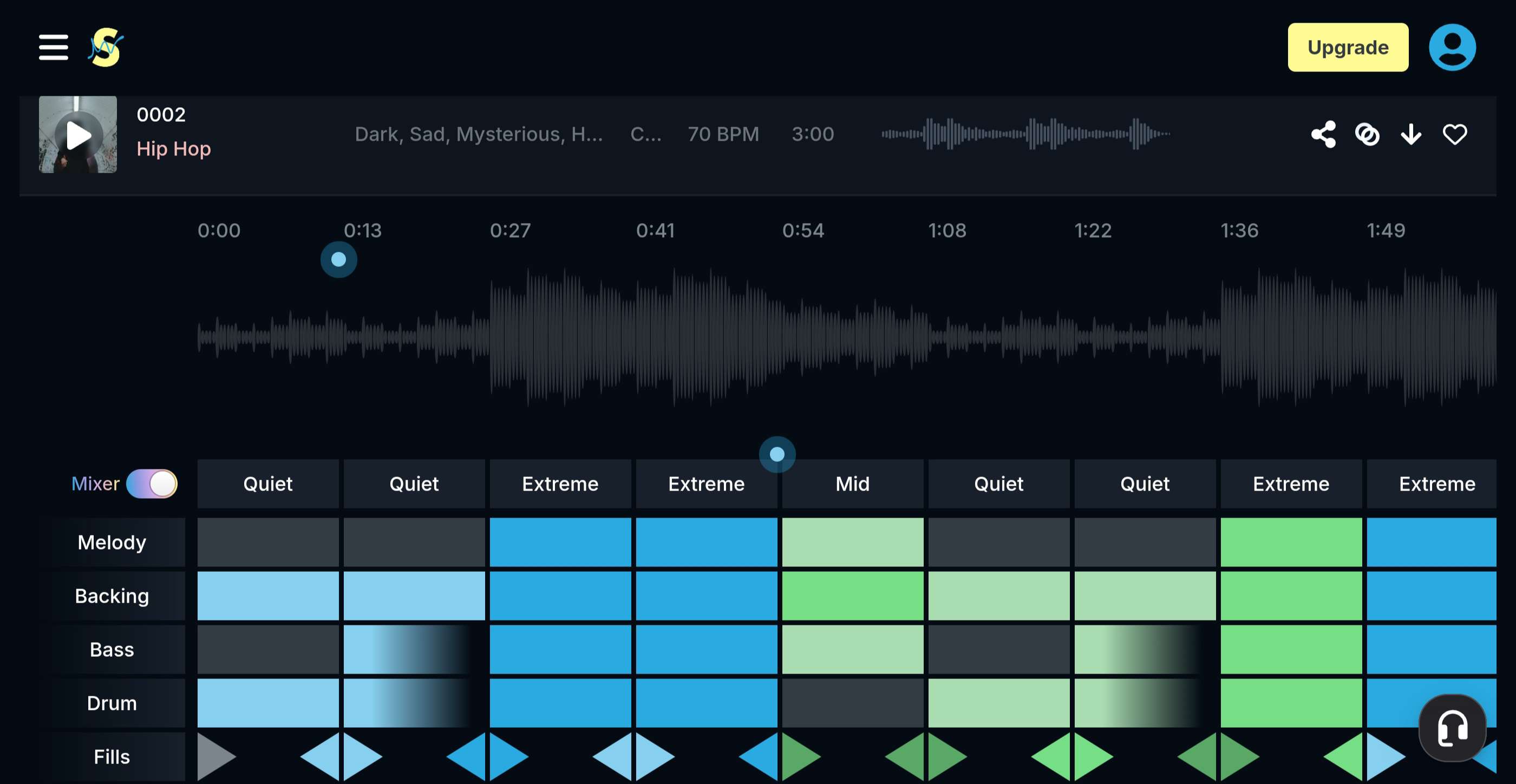
When you have your base track ready to go, move on to the advanced “Mixer” tool. Now this is where things really start to get interesting. You’ll see a grid below the track with “melody, backing, drum, bass, and fill” listed on the left side.
The blocks in the grid correspond with the element in each section of the song and you can change how it sounds by clicking the box from “quiet” to “extreme.” Play around and you’ll eventually land on the perfect settings for your track. You also have the option of adding extra instruments and changing the volume of each track independently.
This might seem complicated, but it’s easy to get the hang of the first time around. That’s the beauty of using SOUNDRAWS editing tools—anyone can do it—you don’t need a sound engineering degree to make things work and master the platform.
Step #4 – Save to Your Library
When you’re done with the final post-production touchups, it’s time to save your project. Just tap the favorite heart on the right of the track and the system adds it to your library for easy access whenever you need it. The cloud-based platform means you don’t need to download the track to your device, but you have the option to do it if you want to.
Take a Subscription to SOUNDRAW and Experience AI-Powered Mobile Music Production
You can waste your time with other mobile music apps for musicians, or you can subscribe to SOUNDRAW and get started right now. We’ve shown you how easy it is to use this tool and the results it offers for your works—you’re not going to find another platform that’s as intuitive and user-friendly as SOUNDRAW.
If you got value from trying SOUNDRAW out, then consider getting a subscription—it’s way more affordable than buying software tools or studio equipment. You’ll pay $12.99 per month for access to the Creator package, and it starts at $25.99 per month for the entry-level Artist Starter subscription.
Those prices are more than reasonable, and probably less than you’re spending on subscriptions to other sites you don’t need. It’s time to empower your music career and give your production skills a boost with SOUNDRAW.
